Stuck on a math problem? Type it, say it, draw it or snap a photo. Mathvelo works through it one clear step at a time, proves the answer is right, and can talk you through the idea on video in your own language. Free, with no account.
Free AI Math Solver With Steps: How It Works and Why the Check Matters
A free AI math solver reads a problem, solves it in named steps and shows the rule behind every move. Mathvelo takes typed, spoken, drawn or photographed problems, needs no account and covers school math through calculus.
1Read
The problem becomes editable text first, so a misread symbol can be fixed before anything is solved.
2Solve
A named method writes short steps, each one naming its rule.
3Check
The answer goes back into the original problem, or the problem is solved a second way. A mismatch shows a warning.
4Teach
Steps reveal one at a time, with a video, hints and fresh practice questions.
A real run. Take 3x² − 12x + 9 = 0. Divide by 3, factor as (x − 1)(x − 3), and the zero-product rule gives x = 1 or x = 3. Both go back into the original equation and return 0. A harder case, ∫ x² sin x dx, needs integration by parts twice and is checked by differentiating the result.
Our take. An answer-only solver makes tonight’s homework faster and next week’s test harder.
217/217Our own testWe re-ran every worked example on our 42 calculator pages through the solver. All 217 matched the printed answer.
The order follows George Pólya’s four steps in How to Solve It (1945): understand, plan, carry out, look back. Our check is the “look back”, done for you.
GRAPHS · DERIVATIVES · INTEGRALS · TRIGONOMETRY
Math, Drawn Live
Slopes, areas and the unit circle draw themselves.
Mathvelo in actionDerivatives: the slope at every point
3D GRAPHER · FREE
3D Graphing Calculator: Plot z = f(x, y) and Spin It
Type a surface such as sin(x)cos(y) or x^2 + y^2, drag to rotate, pinch to zoom, and add up to six surfaces at once. It works on a phone, with no sign-up and no download.
Solve a Math Problem From a Photo or Voice, Then Check It
A photo math solver should show what it read before it solves anything.
Upload a picture or screenshot, or speak or draw the problem. The recognized text appears in an editable box, then the steps follow. A photo of 2x + 6 = 14 reads back as exactly that, then gives x = 4, checked by putting 4 back in. For a clean read, crop to one problem, use even light and keep the page flat. Whole worksheets in one shot cause most misreads.
Checking is a ten-second habit. For −2x + 3 = 11 the answer is x = −4, since −2(−4) + 3 = 11. A sign slip gives x = 4, and substituting it returns −5, which exposes the error. With √(x + 7) = x + 1, squaring gives x = 2 and x = −3, but only x = 2 survives, because x = −3 makes the right side −2.
Seeing every step matters. In Sweller and Cooper’s 1985 algebra studies, students who studied worked examples did better than those who only solved problems alone. Source: MIT TLL
Made for How Students Really Work: Homework, Exams and Class
A good math homework helper matches how people actually study: attempt first, compare second, practise third.
Parents can read the steps before explaining a method at home. Teachers can lift a worked example straight into a lesson. Whoever uses it, write explanations in your own words and follow your school’s rules on AI.
Our take. Use a solver second, never first. Students who try the problem alone learn from the gap; students who start with the answer only learn to copy it.
Dunlosky and colleagues’ 2013 review of ten study techniques rated practice testing among the most useful and rereading among the least, which is why the Quiz me button sits right beside the steps.
Every Math Topic It Covers, From Arithmetic to Calculus
Mathvelo handles school and first-year college math, and 42 topics also have a full calculator page of their own.
What a Math Solver Can Solve: 20 Problems With Answers
A good math solver covers arithmetic through first-year college math. These examples show the kind of input it reads and the answer it should give. Type any of them into the solver above to see the full steps.
Topic
Problem to type
Answer
Fractions
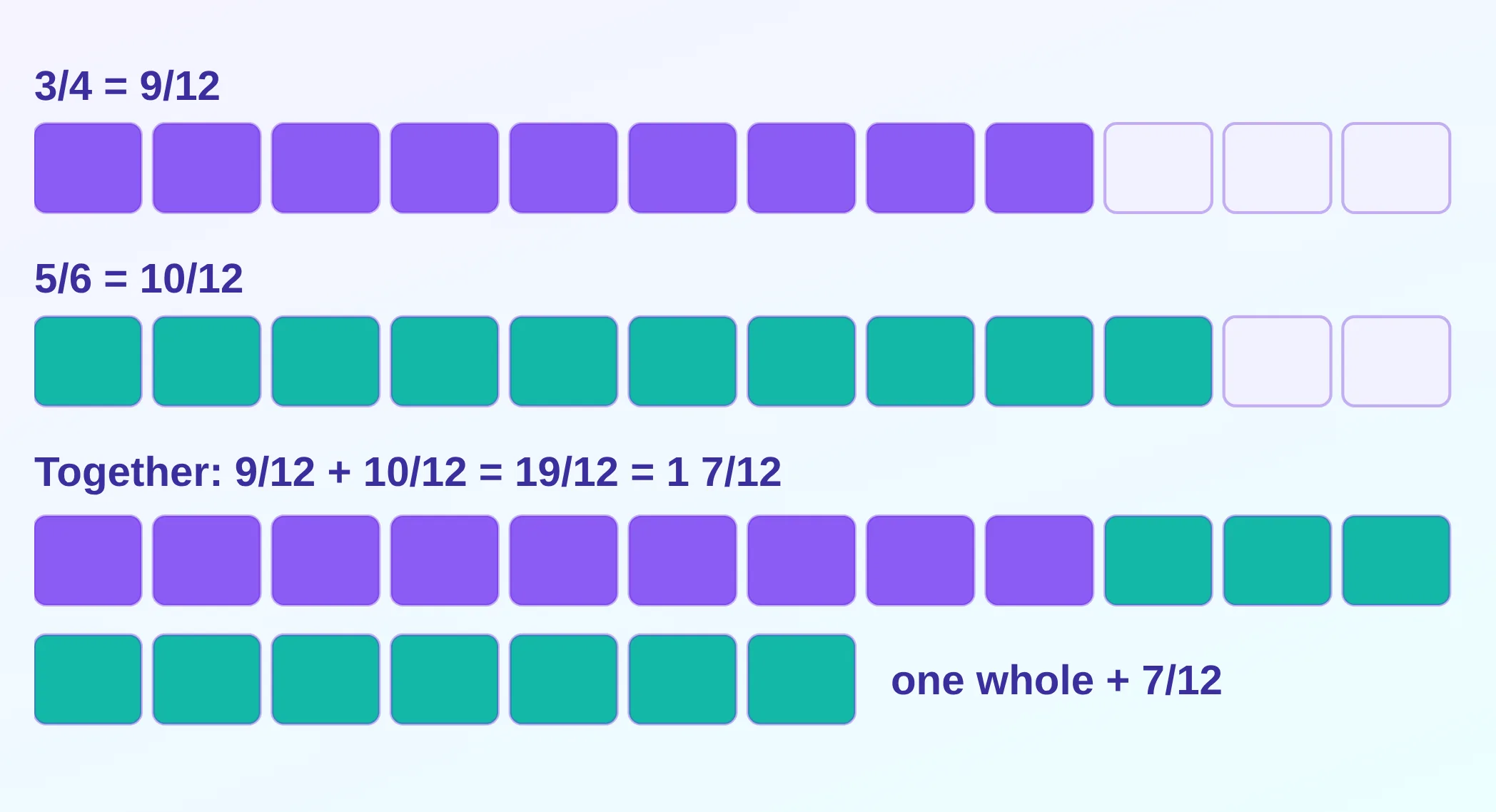
3/4 + 5/6
19/12 = 1 7/12
Percentages
18% of 250
45
Linear equation
2x + 7 = 19
x = 6
Quadratic
x^2 - 5x + 6 = 0
x = 2 or x = 3
System of equations
x + y = 10, x - y = 2
x = 6, y = 4
Inequality
3x - 5 > 10
x > 5, or (5, ∞)
Factoring
x^2 - 9
(x − 3)(x + 3)
Exponents
2^10
1,024
Logarithms
log base 2 of 32
5
Trigonometry
sin(30°)
1/2
Distance
distance between (1, 2) and (4, 6)
5
Slope
slope through (2, 3) and (6, 11)
2
Derivative
derivative of x^3 sin x
3x² sin x + x³ cos x
Integral
integral of 2x from 0 to 3
9
Limit
limit of sin x / x as x → 0
1
Statistics
mean of 2, 4, 4, 4, 5, 5, 7, 9
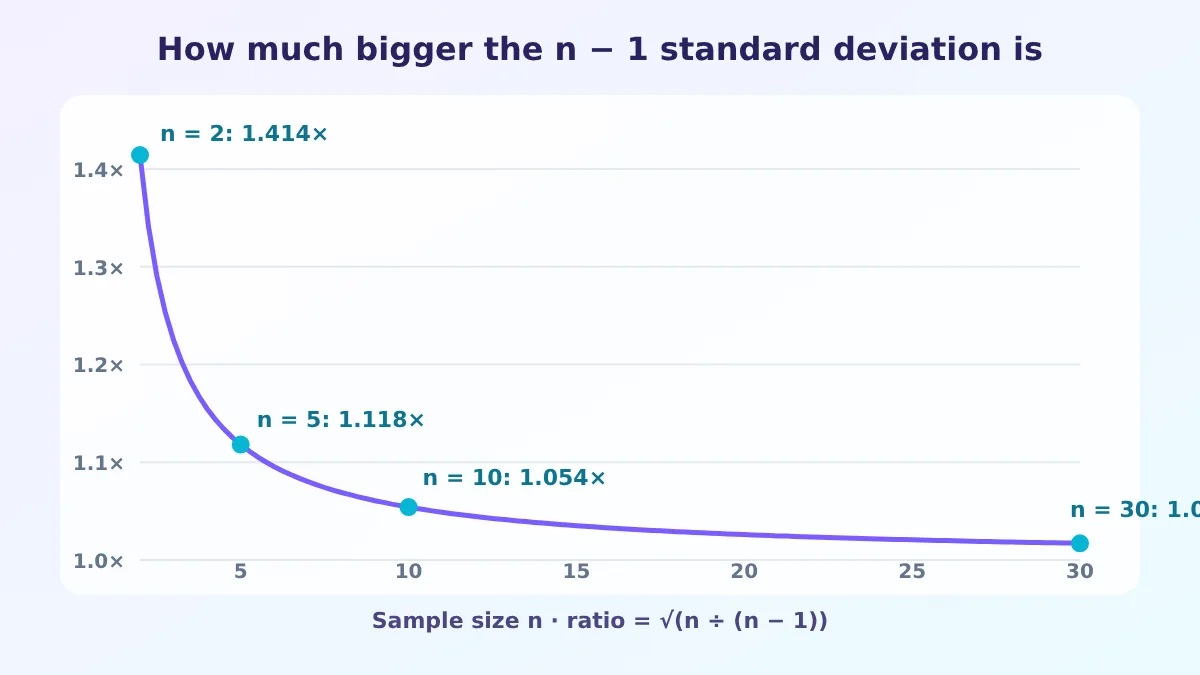
5 (population SD = 2)
Probability
chance of at least one six in 4 rolls
51.77%
Combinatorics
10 choose 4
210
Linear algebra
determinant of [[2, 1], [4, 3]]
2
Word problem
trains 450 km apart at 70 and 80 km/h meet after how long
How a Math Solver Works: From Photo to Checked Answer
Most online math solvers follow the same pipeline. Knowing it helps you judge any answer you are given.
Read the problem. Typed input is parsed into a mathematical expression. For a photo or handwriting, optical character recognition (OCR) turns the picture into text, which is the step where most errors start.
Choose a method. The solver classifies the problem (linear equation, quadratic, derivative, matrix) and selects a rule set, for example the quadratic formula or the chain rule.
Compute symbolically. A computer algebra system works with exact expressions such as √2 or 19/12, so nothing is rounded early.
Explain the steps. Each transformation is written out and named, so a student can follow the reasoning instead of only seeing the result.
Check the answer. Equations are substituted back into the original, and derivatives and integrals can be verified by reversing them.
In Mathvelo the built-in calculators run in your browser, and the AI features send your question or photo to an AI service. That is why the photo box is editable: if OCR misreads a 7 as a 1, you correct it before solving, and the rest of the pipeline works with the right problem.
Overrated. Reading the final number only. A correct answer with no reasoning teaches nothing.
Underrated. The substitution check. Putting x = 2 into x² − 5x + 6 gives 4 − 10 + 6 = 0, which takes five seconds and catches most sign slips.
Plain wrong. “A solver that shows steps is always right.” Steps can be wrong too, especially after a misread photo, so compare the first line with your original problem.
Why Students Get Stuck on Math, and What a Math Solver Should Do About It
A student gets a maths problem wrong at ten at night, searches for help, and finds an answer with no reasoning, a paywall, or a page that is hard to use on a phone. A good math solver fixes that problem: it shows each step, checks its own answer, and explains in plain words. This article covers what students struggle with, what they want, and how this page responds.
In short: students need to understand the next step, not just see the final answer, and a solver earns trust only when it shows its working and checks it.
1
Understand the pain points
What students are stuck on
Most students do not fail at maths because they cannot calculate. They fail because a solution appears with no reasoning attached, and they cannot tell whether it is right.
An answer with no reasoning
Not knowing if the answer is right
Too many separate tools
Typing maths symbols is slow
No way to practise before the exam
2
Understand the frustrations and desires
What they feel, and what they want
Behind the pain sit feelings that are easy to name: ads, paywalls, explanations that move too fast. Each frustration points to something the student actually wants.
Frustrated by ads and sign-up walls. Wants to start in one tap.
Frustrated when the explanation is too fast. Wants to pause, replay and ask.
Frustrated by a wrong answer they cannot spot. Wants a built-in check.
Frustrated by not knowing what to study. Wants a short test and a guide.
Frustrated by tools that break on a phone. Wants one clean screen.
3
Build the page around their intent
Each intent has a place on this page
So the page follows intent, not features. Whoever needs an answer, an explanation, a graph, practice or a calculator lands on the right tool in one step.
I need an answer now: the solver is the first thing on the page.
I need to understand: use the video explainer under any answer.
I need to see it: graph and 3D graph sit just below.
I need to practise: use the + menu for a test or a study guide.
I need a calculator: the Studio keyboard has 500 models.
What the evidence says
The need is real. In the 2024 Nation’s Report Card, only 39% of US fourth graders reached the NAEP Proficient level in maths, and 24% scored below Basic (NAEP 2024 mathematics results). Step-by-step help that a student can actually follow is not a luxury. Some popular solvers also keep full steps behind a paid plan, so it is worth checking each tool’s current free limits before relying on it.
Our take: overrated, underrated and wrong
Overrated: a bare final answer. A number with no reasoning cannot be learned from, and it cannot be checked either. Speed is also overrated: a solver that answers in a second but hides the rule it used leaves the student exactly where they started.
Underrated: checking the answer by putting it back into the problem. For 2x + 3 = 11 the solver gives x = 4, and 2(4) + 3 = 11 closes the loop in five seconds. That one habit catches most sign slips, and it works on equations, inequalities and word problems alike.
Wrong: the idea that a solver replaces practice. It helps most after an honest attempt: try the problem, compare your first different line with the steps, then take a short practice test. The same applies to photos: if the text it reads is off by one symbol, fix it before solving.
What this page offers, in numbers
Mathvelo has 45 topic calculators, a Studio keyboard with 500 calculator models, and a video explainer that can be paused, resumed and questioned. Nothing here needs an account. We have not measured user outcomes, so we make no claim about grades. The honest test is simple: try one of the prompts above and judge the steps yourself.
How to Use a Math Solver to Learn, Not Just to Copy
A solver is most useful after you have tried the problem. This four-step routine follows George Pólya’s classic method from How to Solve It (1945): understand the problem, make a plan, carry it out, look back.
Attempt it on paper first. Even a wrong attempt shows you where you are stuck.
Enter your problem and read only the first step. If it matches yours, cover the screen and carry on.
Find the first line where you and the solver differ. That single line is usually the whole lesson: a sign, a distribution, a missed factor.
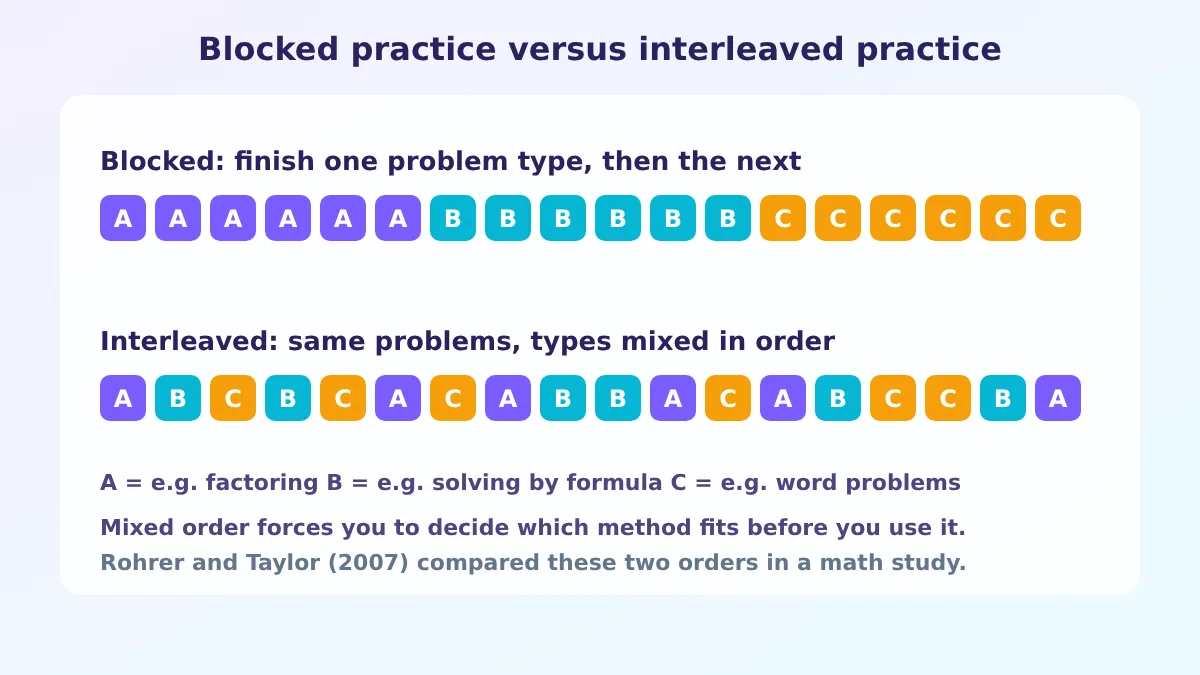
Redo a similar problem without help. Change the numbers and solve again, then use Quiz me for practice.
This is also the honest answer to “is using a math solver cheating?”. It depends on your teacher’s rules. Using it to check work or understand a method is generally studying, and copying answers into graded work is not. Follow your school’s policy on AI.
How Accurate Is an AI Math Solver? Checks and Known Limits
Accuracy has a simple test: the answer must survive being put back into the problem. Mathvelo is independent and not affiliated with Google, Microsoft, Photomath, Symbolab or Wolfram.
Need
Calculator
Chatbot
Mathvelo
Shows the working
No
Depends
Yes
Checks its answer first
No
No
Yes
Reads a handwritten photo
No
Depends
Yes
Free, no account
Often
Often limited
Yes
Overrated: scanning a whole page at once. Underrated: the substitution check, which is dull and catches most sign slips. What goes wrong: odd notation, blurry photos and vague word problems, so compare graded work with your own.
Before trusting any solver, ask five things: does it name each rule, check itself, let you fix a photo misread, stay free without a hidden wall, and say how your data is handled?
Is there a free AI math solver with steps and no sign-up?
Yes. Mathvelo solves typed, spoken, drawn and photographed problems with numbered steps and needs no account.
Can I solve a math problem from a photo?
Yes. Upload it, fix anything misread, and the tool solves with steps.
Can an AI math solver be wrong?
Yes, on unusual notation, blurry photos or vague word problems. Answers are put back into the problem, and a mismatch shows a warning.
How is it different from ChatGPT or Photomath?
It names each rule, checks the answer before showing it, and adds video, hints and quizzes.
Is there a math solver app?
It runs in any mobile browser, camera upload included, and installs to the home screen.
Where do my questions go?
Built-in calculators run in your browser. AI features send your question or photo to the AI service, so avoid private material.
What is the best free math solver with steps?
Look for four things: it shows named steps, checks its own answer, lets you correct a misread photo and needs no account. Mathvelo is free to use and covers algebra, calculus, statistics and linear algebra with those features.
Is using a math solver cheating?
It depends on your teacher’s rules. Checking your own work or studying a method is normally fine, while submitting copied answers as your own is not. Try the problem first and follow your school’s policy.
Can a math solver do word problems?
Yes. Describe the problem in plain English and the solver turns it into an equation, solves it and checks the result. For speed, distance, work and mixture problems there is also a dedicated word-problem calculator.
How do I solve a math problem by taking a picture?
Open the scanner, take or upload a photo, correct anything the text recognition misread in the editable box, then press solve to get the steps.
Which math topics does the solver cover?
Arithmetic, fractions, percentages, algebra, geometry, trigonometry, precalculus, calculus, statistics, probability and linear algebra, including word problems.
Does the math solver work on a phone?
Yes. It runs in any mobile browser, accepts camera photos and can be installed to the home screen.
Try it on the problem in front of you
Have a go on paper first. Then check your answer, read the step where you got stuck, and watch the video if it still will not click.